Free Windows x64 application · Version 8.11.0 · By YoruHikari
Astro Frame Selector
Choose better data before you stack.
Review FITS frames with clear evidence, aligned previews and a session-wide view. Keep your images on your PC and your decisions under your control.
No account needed. Analysis and Personal AI run locally. Optional update checks use GitHub Releases.
From a capture folder to a reviewed selection
- 01
Analyze your lights
Open a FITS folder for a fresh analysis. Evaluate focus, stellar shape, tracking, background and transparency in the context of your captures.
- 02
Inspect and compare
Inspect prioritizes unresolved analysis signals. Use aligned previews, preserved zoom, Compare and Blink to see the differences. Unconfirmed is a separate pending-confirmation count, not a count of bad images.
- 03
Review the session
Use the Timeline and episode browser to investigate periods of change. Build a representative discovery sample or a separate random audit and retain the original predictions.
- 04
Confirm your choices
Give individual Keep, Review or Reject decisions. After reviewing the remaining automatic Keeps, Complete review records an explicit, reversible attestation. Save your session, then confirm any proposed Reject moves.
Tools for a more deliberate frame selection
- Keep, Review and Reject decisions with individual correction and Undo/Redo
- Inspect signals and a separate Unconfirmed queue
- Display-only star alignment, meridian-flip registration and preserved zoom
- Side-by-side comparison and Blink through the visible frame list
- FWHM, star-shape, tracking, background and transparency measurements
- Session Timeline with filter selection and tentative episode signals
- Representative discovery samples and separate random review audits
- Local Personal AI with equipment/filter validation progress
- Explicit Complete review and reopening when selection criteria change
- Confirmed Reject moves and journal-based restoration
- Saved sessions, frozen-prediction reports and CSV export
- Custom workspace layouts, searchable Help and authenticated application updates
Example FITS review session for WR 114
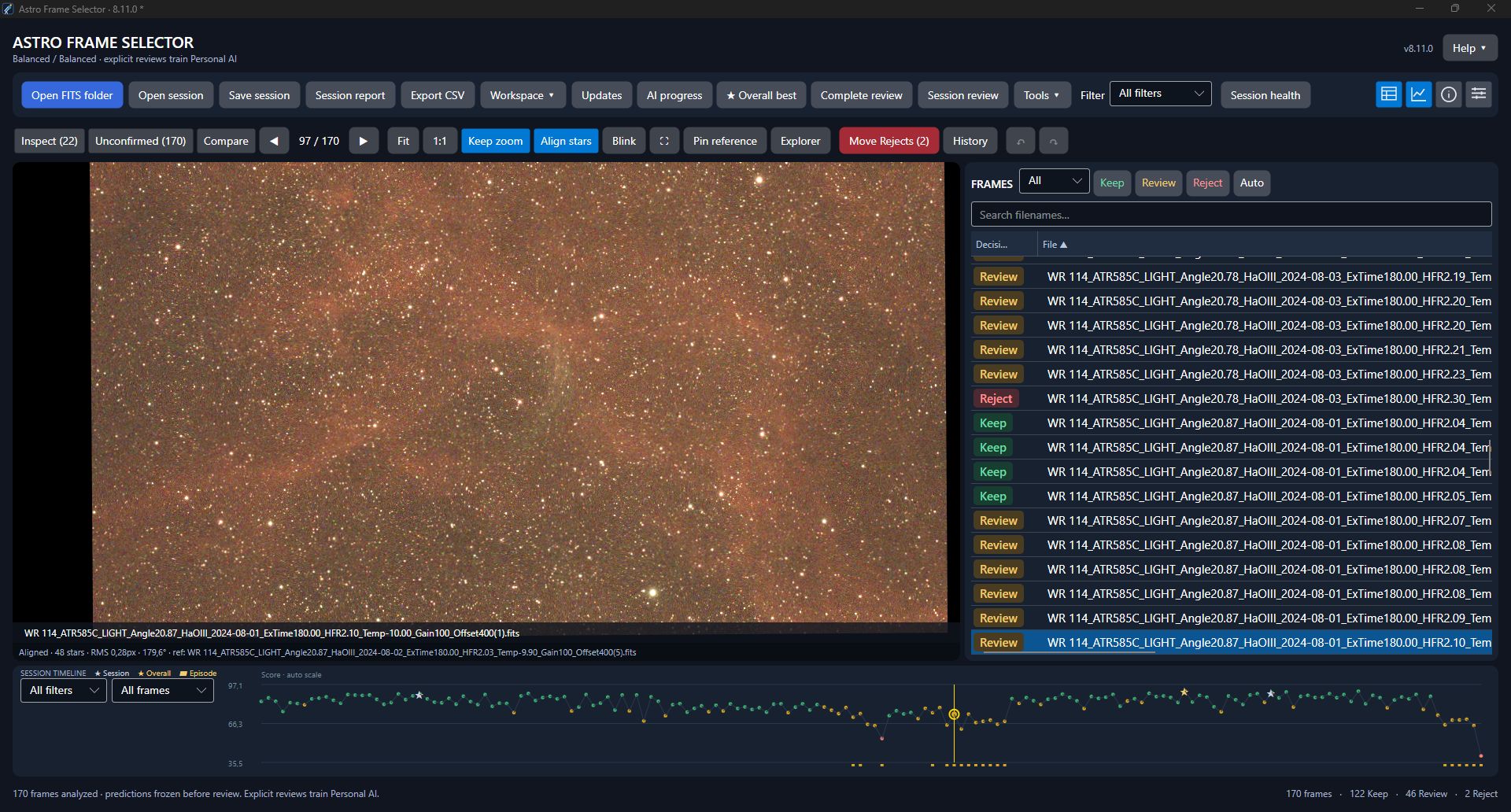
The workspace below shows 170 WR 114 exposures. Inspect the Timeline for changes across the session, then open a frame in Compare to check it against a reference at the same sky orientation. The workspace shows the resulting Keep, Review and Reject suggestions alongside the previews. Open either screenshot to inspect it at full size.
One view of the capture session
A real 170-frame review session with the current exposure, file decisions and Timeline visible together. Displayed suggestions are an example, not a measured accuracy benchmark.
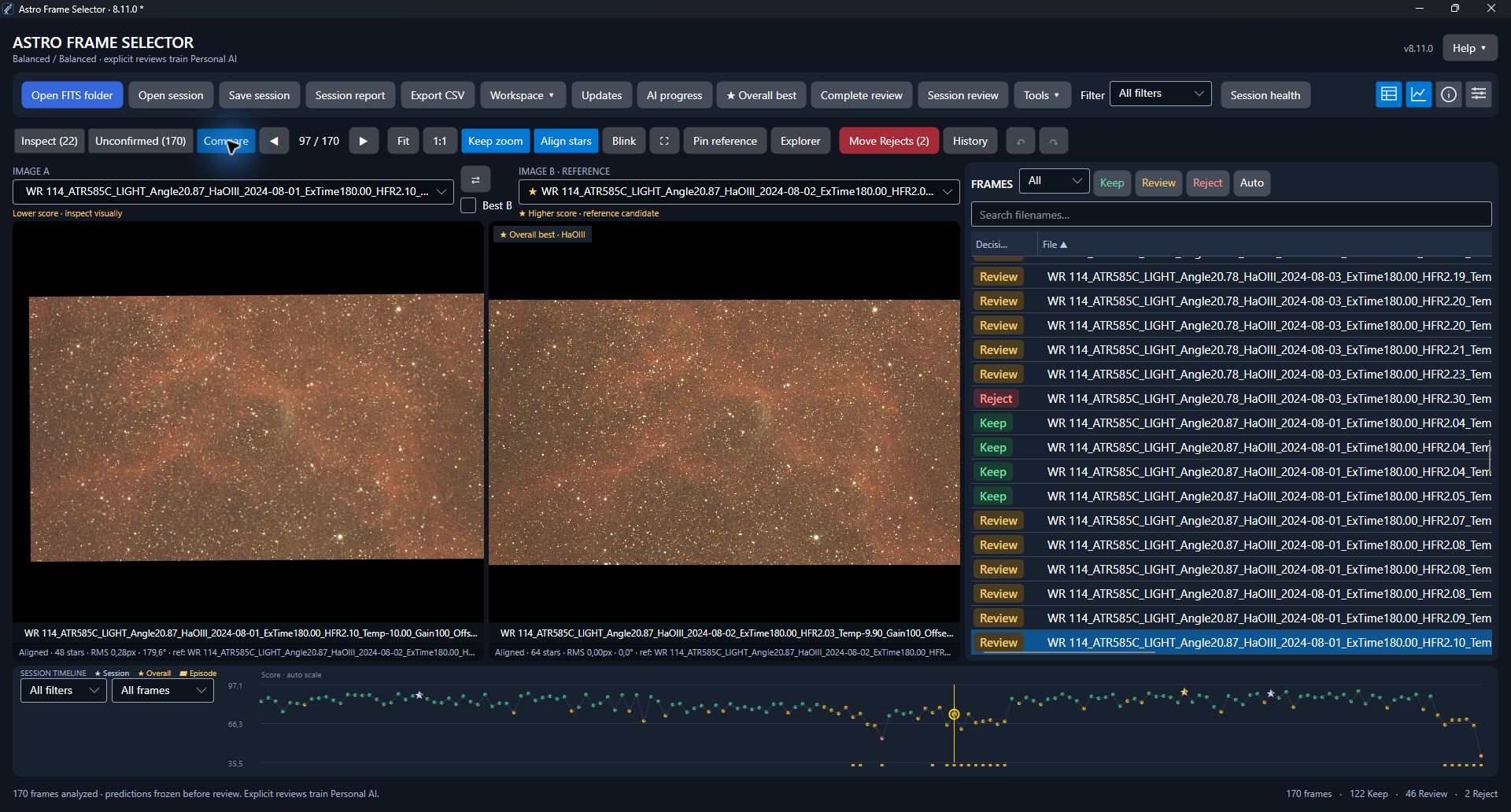
Compare frames in the same sky orientation
Compare a selected exposure with a comparable reference. Star alignment is display-only; the original FITS pixels and scientific measurements remain unchanged.
Your preferences can evolve
A frame that was acceptable with two nights of data may be less useful after you add more. Correct individual decisions, undo an edit or reopen the session confirmations and review again under stricter criteria. Added nights are never silently confirmed.
See what the AI has actually learned
AI progress separates training examples from validation observations, capture dates and remaining requirements. Session-confirmed preferences can teach the model, but do not certify its accuracy. Display stretch and alignment never change the scientific measurements.
Questions before your first session
What does Astro Frame Selector do?
It is a free Windows application for reviewing deep-sky FITS light frames before stacking. Measurements, preview comparison and session context help you choose Keep, Review or Reject.
Can it replace every manual frame check?
Inspect prioritizes existing analysis signals, while Unconfirmed tracks decisions still awaiting confirmation. Automatic decisions require matching-context validation and ongoing human auditing. Recommendations and scores are heuristics; no general accuracy guarantee is claimed.
Does it change or upload my FITS files?
Preview stretch, background neutralization and alignment do not modify source pixels. Analysis and learning run locally without uploading your FITS or labels. Update checks use GitHub, and file moves require an explicit confirmation.
How does Personal AI learn my choices?
Individual reviews and a separate explicit Complete review attestation can teach local preferences. Ordinary automatic or bulk acceptance and moving Rejects do not teach it. Session-confirmed preferences are tracked separately and never count as independent validation accuracy.
Can I revise a confirmation after adding more nights?
Yes. Correct a frame individually or reopen the prior session confirmations for the selected target and filter, review the expanded data under your new criteria and confirm again. Added nights are never silently confirmed. Snapshot corrections can retract old preferences; new learning requires fresh analysis.
Can rejected frames be restored?
Confirmed moves create a recovery journal in Rejected. Use Restore files from Rejected with the original move journal, review the exact paths and restore eligible files without overwriting existing destinations.
Should I download Setup or portable?
Setup is the recommended Windows x64 installation and enables the installed application update workflow. The portable ZIP runs without installation. Existing legacy ZIP users should install the current Setup to use the new update system.